Currency values that wouldn't convert in collection management main window
A mystery solved with why collections management was displaying different values between users.


how one small drop down setting caused a year-long mystery in Collections Management
It started, as these things often do, with a perfectly reasonable request.
"We regularly need to see the balance of a currency account in GBP". Simple enough. Click the column heading in the aging table, toggle it from the foreign currency to "Amount" and we have shown right?
But alas, the currency symbol disappeared from in front of the value, but the values themselves did not convert to the functional currency.
This was happening in the aged debt grid of the main collections management screen in GP.
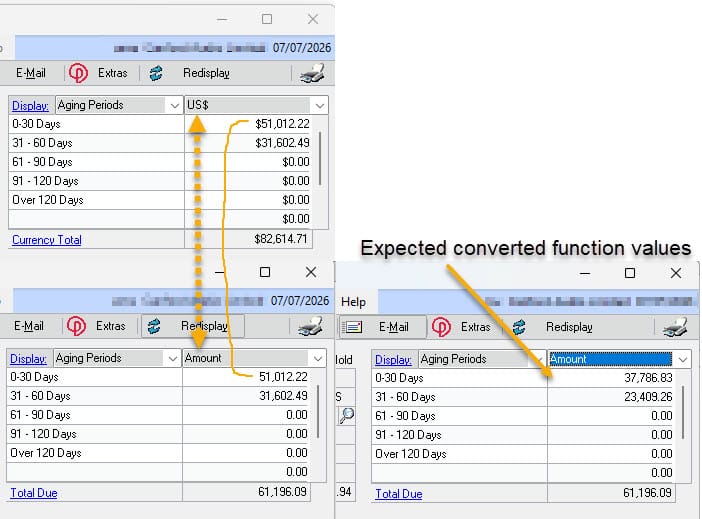
The numbers were still sitting there in whatever currency they'd started in -huh?
The Plot Thickens
We work through process of elimination, is it just this machine?
Nope. Multiple users. Multiple debtor accounts. The issue followed the user, rather than the machine. No pattern anyone could pin down as to who got the bug and who didn't. Some people on some machines, looking at the exact same debtor account, saw the conversion work, others, nope!
It was user related, something has to be stored in the database or on the machine and also keyed by user, to make this happen in this way. I needed to do some digging, but first collections management was brought up to the most recent version to ensure it was not a bug that has been fixed and to allow a support ticket to be raised, should it get that bad.
Round Two: "New Update, Did It Help?"
Fast forward almost a year, because sometimes that's just how these things go, right? - so with the module upgraded, did the update fix it?
...alas, still the same issue.
The Culprit, Revealed
I knew it was user keyed, so I did a search on any CN prefix tables (collections tables), that contained USERID as a field, then looked at only the tables where it looked like it was settings table. This led me to table CN90000. Then comparing rows between good and bad users, there was a pattern where one record was being consistent between good and bad. This was the objectID "GROUPVIEW", a setting that had a value of 3 on the bad users and 2 on the good.
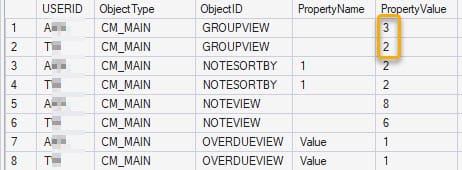
So, what is group view? -back to actually reading the help documentation properly, we all know we do that first right? lol
In the Collections main window options is a setting called National Accounts Single/Group.
Here's what the help text actually says:
National Accounts lets you choose Single (Ctrl-N) or Group (Ctrl-G). Single shows just that customer ID's own notes and aging balances. Group rolls up all the notes and totals across the whole National Account. (National Accounts have to be registered for this to apply.)
This drop down was the culprit, changing the setting in the options window that hangs off collections management brought the window back to how it was desired. Annoyingly I had seen this setting in my original exploration of the issue, but had not thought it relevant - grr.
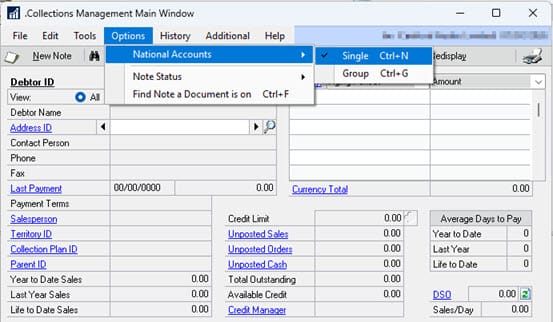
Set it to Single, and the aging table behaves exactly as desired.
Set it to Group that rolls up National Account totals and that aggregation logic skips the conversion step.
I did search for this issue when I started, so I've blogged it for others now.