Visual Studio Integration Toolkit registration expired or failed

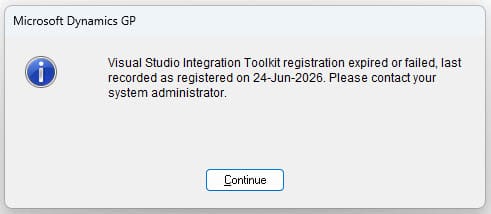
This is a very niche Dynamics GP issue that I experienced.
With this dialog, you need to re-register the software.
To re-register, login as sa, find the Visual Studio Integration Toolkit Registration form and re-register the product. If you have messed up or for whatever reason the registration server is not available, but the license was still previously valid, just damaged or removed, then follow the following instructions to restore the license.
However I couldn't re-register so here is the story in case it help you.
What is VSIT?
Visual Studio Integration Toolkit for Dynamics GP is a bridge product that allow developers to reach into the GP application in ways that the native .NET integration does not provide for.
It is well worth installing, find the product portal here
https://winthropdc.blog/visual-studio-integration-toolkit-portal/
My problem was not caused by the product, the product is awesome, rather me messing up somehow whilst testing an upgrade in our sandbox copy of GP production environment. The production copy of the software lost its license keys during the process of testing the upgrade in the sandbox. I suspect the wrong version of the client software got used against production.
This resulted in wiping of the product keys, and the above dialog box being presented to users, and users losing the extra menus within GP that the kit provides. As this was mid-afternoon, I needed a solution before it affected more users. Luckily it only impacted the few users who had logged out and in to GP after the wipe, other users were warned of the issue, preventing more.
Restoring registration
So first instinct was to try to re-register the software, unfortunately in my particular case, registration had been prevented by the vendor for older versions of the client software so this was not an option.
The next thought was to put the records back to how they were before the software keys got corrupted. Luckily as upgrade testing was already in progress, the restore scripts were ready to hand so the restore the DYNAMICS database in our test environment only took a few mins to perform. In GP most shared information like keys are held in this DYNAMICS database, luckily it is a small database hence it restored quickly.
Software keys table
Performing a SQL search for the table within DYNAMICS, that is containing the keys revealed it to be table WVS40001. Checking the content between these tables revealed a number of the fields were blank in production that held values in the restored table from earlier in the day. Those fields corresponded to what looked like encrypted hashes for the license.
SELECT
       [RegisterProductID]
      ,[RegisterProductIndex]
      ,[RegisterProductQLMID]
      ,[RegisterProductName]
      ,[RegisterProductCode]
      ,[RegisterProductKey]
      ,[RegisterProductVersion]
      ,[RegisterProductExpiry]
      ,[RegisterProductStatus]
      ,[RegisterProductStatusStr]
      ,[RegisterProductError]
      ,[RegisterProductMode]
      ,[RegisterComputerKey]
      ,[RegisterComputerID]
      ,[DEX_ROW_ID]
  FROM [DYNAMICS].[dbo].[WVS40001]
Copying the content of those fields for each record, from the restored backup to production fixed the issue. The license message dialog no long popped up and the menus functionality was restored back to the users. Happy times!
Fields restored for each product record in the table:
[RegisterProductKey]
[RegisterProductStatus]
[RegisterProductStatusStr]
[RegisterComputerKey]
[RegisterComputerID]
Information about upgrading VSIT can be found here...
https://winthropdc.blog/2018/07/18/vsit-updating-visual-studio-integration-toolkit/