Save on token costs using OpenClaw
Why does OpenClaw use so many tokens and how to reduce token useage.

OpenClaw greedily devours tokens maxing out AI plans. People running OpenClaw for the first time, even after just an hour notice AI tokens are rapidly depleted form thier AI API account. This happens much faster than people have experienced before. It is not uncommon to read, "I've hardly done anything and its already consumed what I normally pay for a month with desktop AI".
When you understand what OpenClaw is a state engine for AI and then when you understand how it works, it becomes fairly obvious why it is such a beast when it comes to token consumption. The reason lies in how OpenClaw constructs every single request it sends to the model. Forming an basic understanding of the context, heartbeat and cron processes will help you navigate the costs. Ultimately being aware of how it works, let you run OpenClaw to minimise costly habits or actions.
How Token Consumption Actually Works
A chat based LLM interaction is simple, you send a prompt, the model returns a completion after inference. Input tokens in, output tokens out. Simple AI APIs such as chat completion or Gemini GenerateContent APIs work like this and you get a lot of control over context.
Now using a typical desktop AI interface, a lot more context is added to each request, the history of the chat is bundled in with each subsequent request to create a stateful conversation.
Then we have OpenClaw, which is adding a heap more sources of state and volume of history, to create a stateful engine. This gives us the interacting with a human employee experience. Every time you send a message to your OpenClaw agent, be it a simple question or a problem task, then the system packages up a all this content and history int the payload before it ever reaches the model. OpenClaw makes extensive use of markdown format files is used to create persistence of information over time - a memory system. The content of these files is submitted each time a something is processed by the AI engine.
The payload that accompanies your requests includes:
- Core system instructions - the hardcoded behavior rules baked into OpenClaw itself (significant content volume)
- Your configuration files markdown files - agents.md, soul.md, memory.md, and any others present in your setup (can become very significant)
- The full conversation history - every message and every tool call result from the current session, appended in full
Think about that last point, OpenClaw doesn't summerise or prune your session history automatically. It sends the whole thing, every time. So if you've been running a single session for several days and your agent has executed a dozen tool calls along the way, every new message you send carries all of that accumulated context as input tokens.
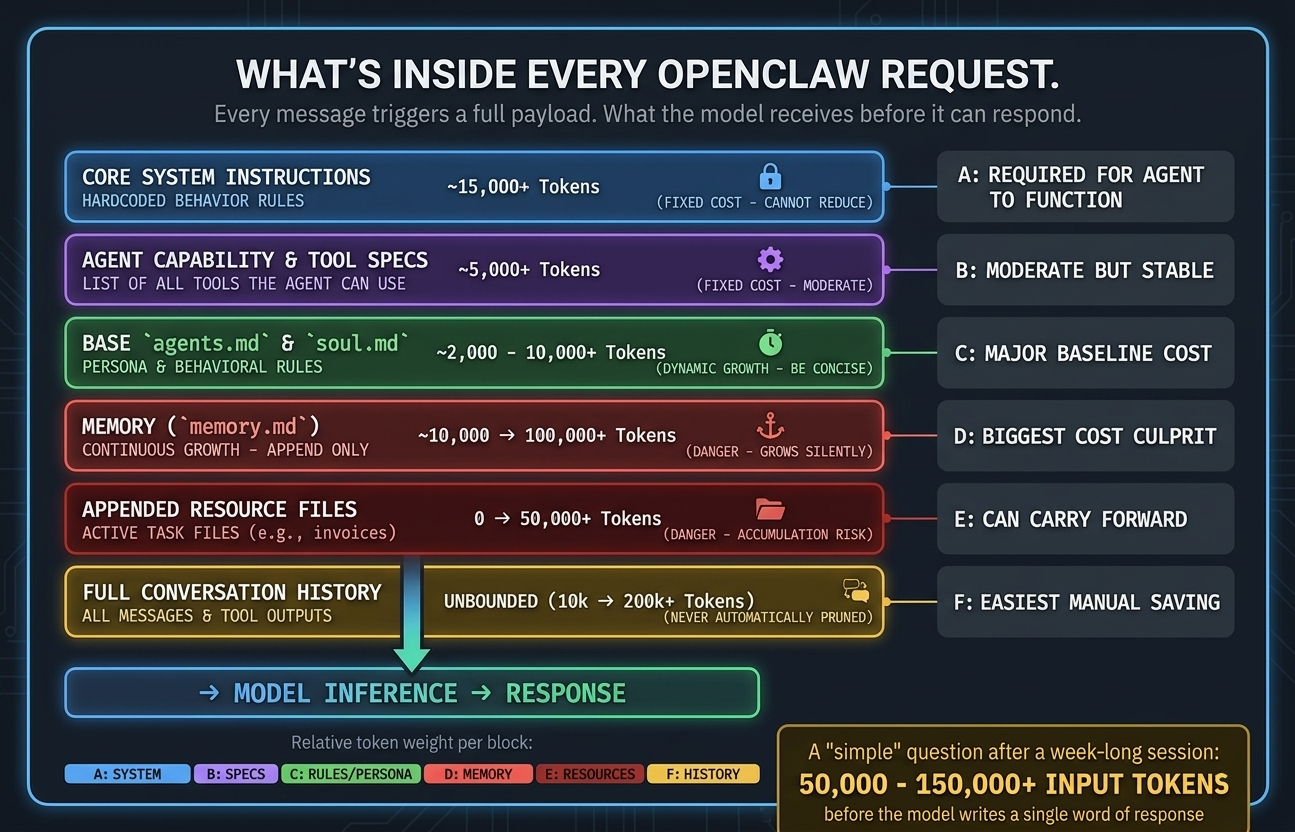
A simple question like "what's the current status of my work item" might look like a few hundred tokens on the surface. In practice, with a week-old session and a populated memory file, you will be looking at tens of thousands of tokens per message.
This is super important to fully grasp, the heartbeat that gives OpenClaw it life, will beat all through the day, every day, processing the full context on each beat, even if there is nothing to be done. This alone can cost you many £$ per day.
OpenClaw harnesses Agentic AI, so it is even worse
This gets even worse for autonomous tasks. When you ask OpenClaw to do something that requires multiple steps say updating its configuration and restarting the gateway service then reporting back status as it goes, this is not one single call to the AI model. Each little step is its own cycle, that sends the full context again and again. A task that you think is like one request can easily be five.
This is fundamentally different from those bare API calls to a chat completions endpoint. Those calls are cheap as you control exactly what goes in the context with the call and by its nature it is minimal. To achieve what OpenClaw does, that OpenClaw power, the autonomy, tool use, persistent memory, that all comes with a significant cost in token consumption to process all that extra context far more frequently that traditional AI use would do.
MD Files that drive the system
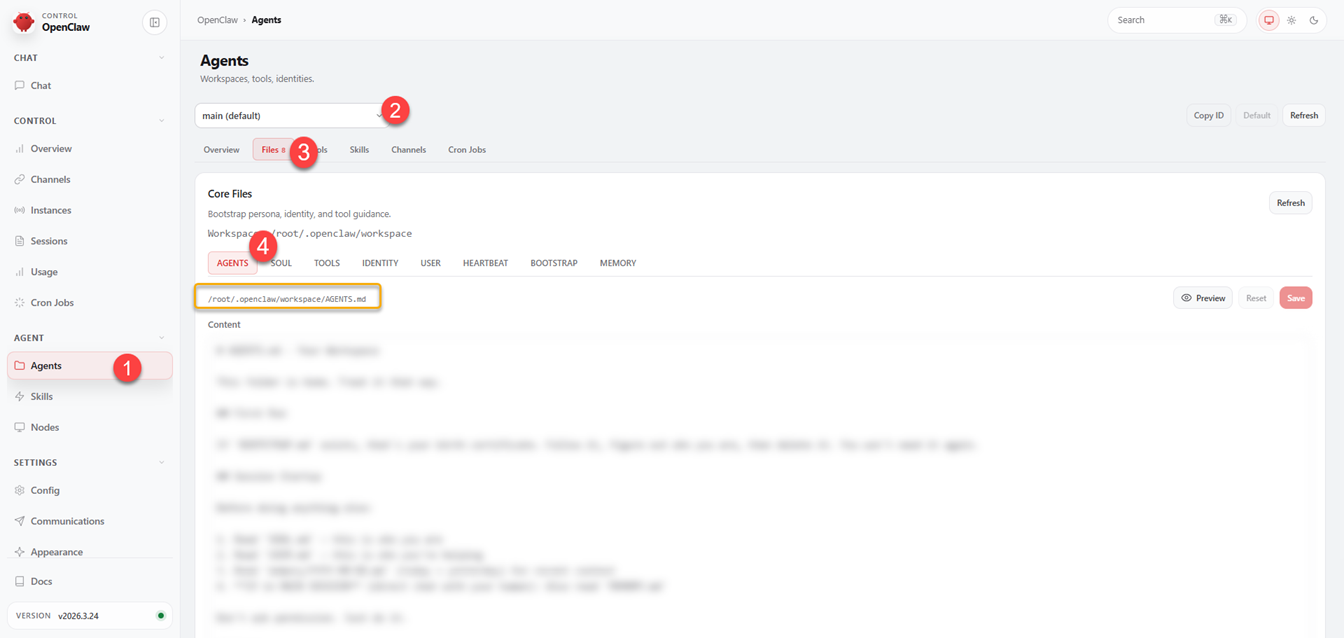
As introduced earlier, the power of persistence is granted to OpenClaw, largely via the use of markdown "resource" files, these files get included in every request. Understanding what each one does will help keep your costs more controlled. You can see these files in the dashboard, under agents.
Agents (1) >> Select workspace Agent (2) >> Files (3) >> Select Markdown File (4)
You can preview the files using the Preview button.
agents.md
This is the operational overview for each agent, defining how the agent should behave, how to respond, what tools to prefer, when to spin up other agents, and any task specific instructions that have been added.
Because this file is "manually" maintained, it tends to be reasonably stable but it can accumulate redundant or duplicated instructions across sessions. A bloated agents.md adds overhead to every single request.
How to keep efficient: Review this file periodically. Use an AI model to compact it and de-duplicate it. Look for anything that can be shortened without losing meaning. The aim is to convey the meaning with minimal bloat to avoid unnecessary token consumption.
There are however instructions worth adding if not already there:
- Limit response length - instruct your agent to respond in one or two paragraphs by default and wait to be asked for more. Long responses consume output tokens and get then get reused as context on the next turn. Think about how long the responses are in desk top AI tools, in that context a few paragraphs of response to every request gives a rich experience, but you want concise short responses for OpenClaw.
- Skip commentary - tell your agent not to say, ("Let me find that for you…") etc. This narrative creates extra model cycles in front of the actual action, meaning the context gets processed yet more times.
- Use sub-agents for heavy tasks - any significant niche tasks such as, research, coding, or multi-step processing should be handed to a sub-agent with its own session context. That keeps your main session clean and smaller. This is good practice anyway, as it allows the appropriate AI model to be targeted for the nature of the task, or for cheaper alternatives to be used where quality is not as important.
soul.md
Agent personality and communication style. The tone, character, how it interacts with you. Normally it's small and stable, but it still gets included in every request, so keep it slim and concise.
memory.md
This is the one to watch most closely as its the culprit for large token consumption. memory.md is a memory file that your agent appends to with information from past conversations, preferences expressed, things learned about your workflows. Unlike the other files, this one grows continuously and automatically.
After several months of active use, memory.md can become super large. And because it's included in every request, a bloated memory file is one of the most direct ways to silently inflate your per message token cost.
What to do:
- Audit it regularly. The same pattern applies as with agents.md, ask a AI model to identify redundancy, outdated entries, or anything that can be condensed and compacted.
- Consider scoping memory by context. Rather than one monolithic memory file, you can maintain separate memory files for separate domains, only include the relevant one per session.
- For session-specific notes, use a temporary file rather than writing to memory.md. At the end of a session, decide deliberately what actually deserves to persist.
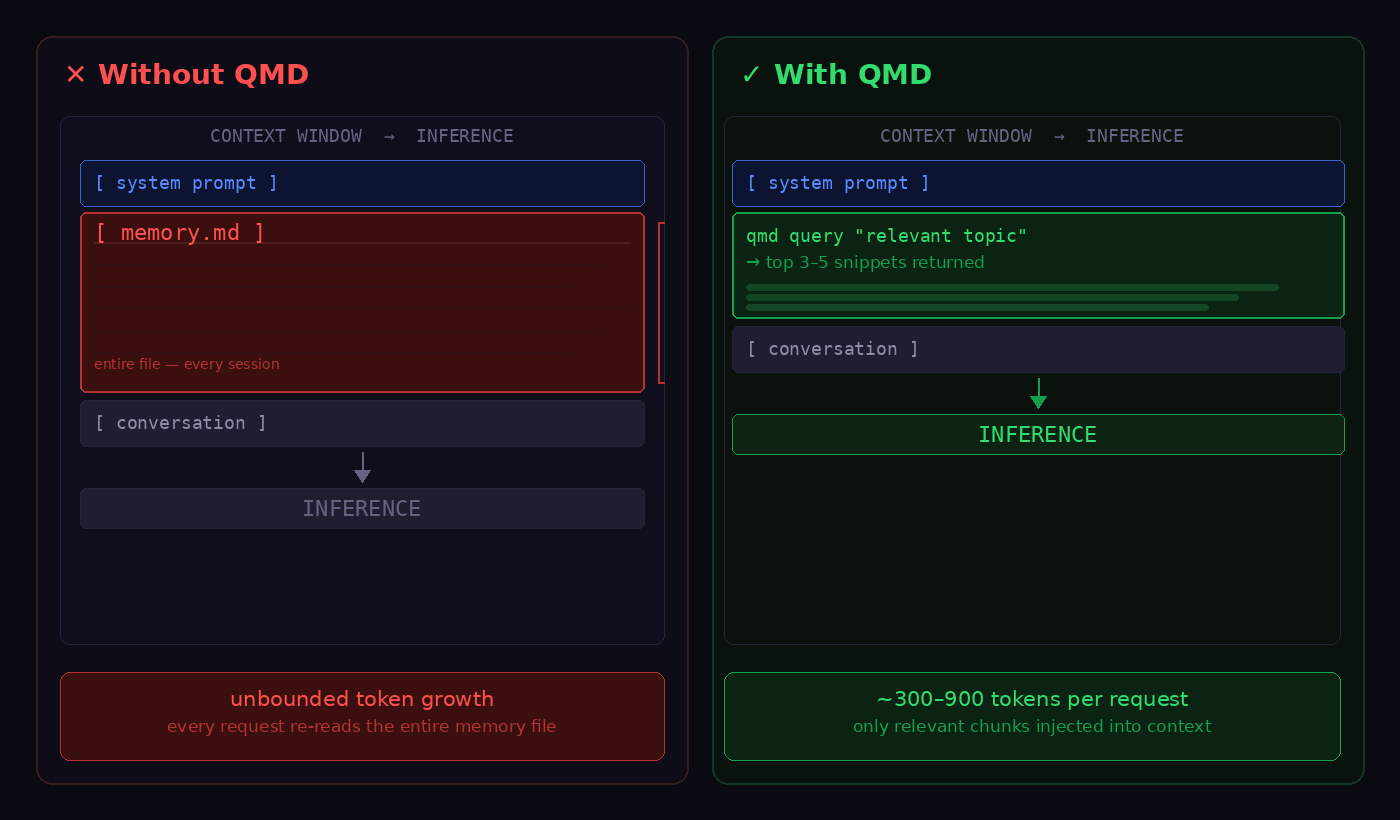
- I would highly recommend looking at https://github.com/tobi/qmd, get your OpenClaw to install QMD, it introduces a more efficient & better memory system. QMD does not replace the memory.md, but it does replace the memory context section provided to the AI engine. QMD uses BM25 keyword search, vector similarity search and LLM re-ranking to check the relevance of the result before using it (local Qwen3 model). QMD uses a light weight local SQL database to get much more specific and smaller context to use for the memory part of the request, avoiding bundling everything from history every single request.
How QMD combines keyword search and vector search using Qwen3 local model to merge and select results.
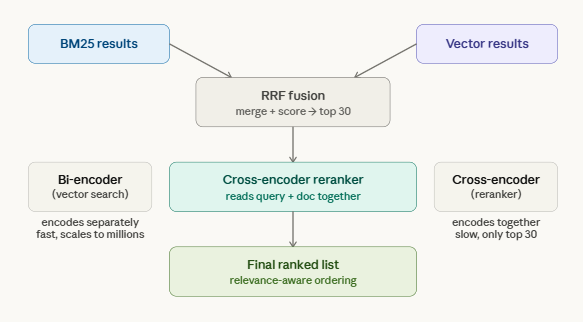
Here we see how QMD improves the accuracy and size of the context.
Tracking: If memory.md has grown significantly, open it up and trim it. Do a quick scan to remove obvious bloat.
Session Management
Session hygiene is one of the most impactful things you can do for token efficiency, and it's often overlooked because the costs accumulate gradually and invisibly.
An open session accumulates context indefinitely. Every message, every tool call result, every agent response, all of it gets appended and resubitted on the next turn. A session running for a few days, without a reset is carrying a lot of bloat.
Commands to help manage sessions
OpenClaw exposes a few slash commands that are worth using pro-actively from your telegram session:
/status - Shows you the current session state, which model is active, how many tokens are in the current context window, and your consumption so far. Run this periodically to get a concrete sense of where you stand. If you're pushing 800k tokens in a session that has a 1M limit, you know to act.
/compact - Compresses the current session context without starting a new session. If you are in the midst of a complicated task and don't want to lose continuity, this is the tool to reach for. It can reduce a bloated context to a fraction of its size while preserving the important state.
/new - Starts a fresh session, clearing the context bloat. What you can do, if you need to preserve continuity, before running this, have your agent write a summary of where things stand to a temporary markdown file, current state, blockers, next steps etc. Start the new session and point the fresh agent at that file. That will allow only the essentials to come through to the next session, much like what you would do on desktop AI.
/model - Switches models mid-session. This is helpful if you wish to target specific models for particular things. Or want to keep cost down by switching to less expensive model for some tasks.
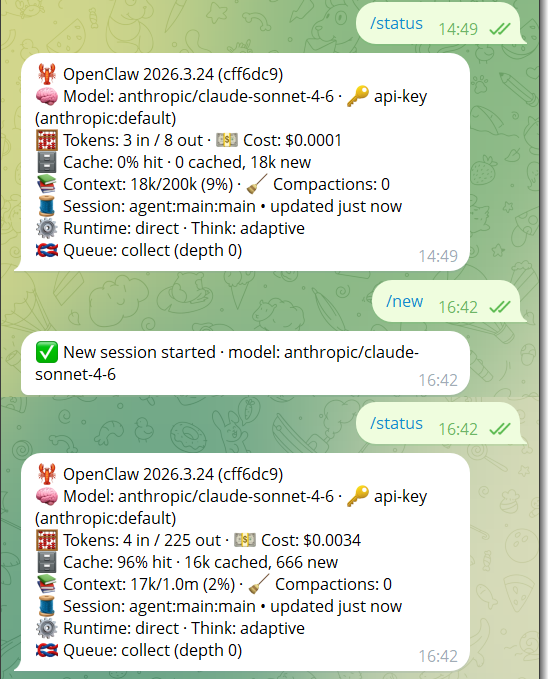
Above we can see the session context drop from 9% to 2% on creation of a new session. This also shows how there is an overhead from system like prompts in a session, as the session did not drop to 0%.
A Practical Session Strategy
- Reset frequently for general-purpose conversations. Don't let interactions run for days, its easy to not realise on a long Discord or Telegram chat.
- Use /compact for long-running work keeps token use down by reducing context.
- Keep cron jobs - cron jobs fire without historical context, which makes them significantly cheaper than heartbeats that fire into an existing session.
- Heartbeats A heartbeat firing every 10 minutes into an existing session is 144 executions per day, each carrying the full session context. At even a modest cost per execution, that's real money. Use a smaller model for heartbeats, and consider whether a cron job (which opens a new, clean session) would serve the same purpose. Reducing heartbeat to 40 mins frequency, would reduce executions to 36 per day, also something to consider, depending on how you use OpenClaw.
Model and Cost Optimisation
False economy of cheap models?
A smaller or less capable AI models running agentic workflows that have complex tool calls may frequently fail, keep looping, or produce crappy results, which means more retries, thus consuming more context that means more tokens to process it and so more cost than a capable model. So what I mean here, is don't just look at the cost, think about the value that model brings.
Getting the right model for the task, a reasonable structure:
- Primary assistant sessions: Sonnet class model, good reasoning, solid tool use, manageable cost
- Heartbeats and lightweight monitoring: A smaller model is appropriate, as long as it has fair agentic capability
- Complex onboarding, setup, or multi-step reasoning: Opus class for the task, then drop to Sonnet or smaller for follow up
Also remember OpenRouter is an option that gives you a single endpoint and API key with access to models from Anthropic, OpenAI, Google, Mistral, and others. Set it as your base URL in your config, then assign different models to different agents or tasks without juggling credentials.
Open source local models can also help take some of the burden from the paid for API models. I expect to see more an more use of local models as agentic systems mature.
Offload Non AI Work
This is such an important thing to remember when working with AI. Not everything needs a AI LLM, especially repeating logical tasks. Scheduled reports, data retrieval, webhook handling, and conditional logic are all things that can be handled by an automation tool such as n8n, or make.com. These platforms are at near-zero cost, with the model only invoked when actual reasoning is required, or maybe not at all if its just a logical problem. A daily summary report routed through an n8n workflow with a single, minimal AI node will cost a fraction of the same task run directly through your main OpenClaw session.
Like wise use open claw to write a Lamda function or other software endpoints to allow work to be outsourced to that module. This is if AI is not really required for that task.
Set Spending Limits to avoid shocks
OpenClaw lets you set credit limits at the API key level, so go set a limit for your budget, this prevents runaway spend from a misconfigured heartbeat or an unexpectedly expensive task. It is also wise to do this on your model providers too, look at what limits can be set in the account settings there.
Summary
OpenClaw's token consumption cost is high because it is genuinely doing more than a simple API call, that is the whole point of the product! It's maintaining context, executing multi-step tool workflows, and managing persistent memory across sessions.
- Keep your MD files lean. Audit agents.md, soul.md, and especially memory.md regularly. Consider one of the many alternative memory solutions.
- Reset sessions. Use /compact when you need continuity, /new when you don't.
- Match models to tasks. Use capable models where reasoning matters, then drop back to cheaper ones for routine work.
- Offload non-AI work. Automation tools can handle scheduling, data retrieval, and conditional logic for free.
- Set limits. Use a hard spending cap at the API key level is the simplest safeguard against unexpected cost shocks.