Auto cache saves 50-90% $ on your AI model costs without you lifting a finger
Auto prompt caching is a feature built into most popular models and it is quietly saving you on your API costs.

Did you know that it is likely you are already caching your prompts. It depends on your AI model and also, how your prompts are built. Until recently I didn't appreciate that auto prompt caching (sometimes called context caching), is a thing however it is silently taking your input promps/context and resusing what it can, saving you money. You can help it improve, by understanding what is going on.
Auto prompt caching is implemented by the the major frontier model products, and it can reduce your prompting token costs by 50-90%, but more than that, latency can be dramatically improved too due to less processing being required.
So for example, how do Kimi K2, MiniMax, OpenAI's GPT models and Google Gemini use auto caching?
What is prompt caching?
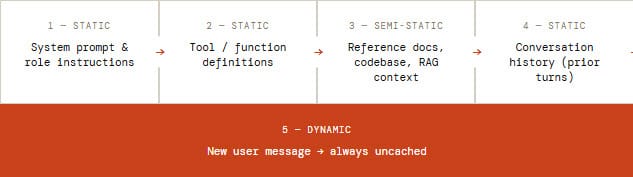
The prompt you provide your AI with that is comprising of your system prompt, any background documents, conversation history, and the new user message will be processed every request by your AI model. First the prompt is processed, it is converted to tokens. This process is expensive. Prompt caching (also called context caching), keeps a copy of the internallly computed static portion of your prompt (the prefix), and reuses that pre-prepared portion of your prompt on subsequent requests, avoiding the need to re-compute it.
I love the geeky detail, but you can skip this if you don't need to know it. Internally what is actually being stored is the key value tensors, that were produced by the model's transformer. This values model your input, making it ready for consumption. When the following request comes in, that is within the cache lifetime, and that request shares the same prompt prefix, then the previously cache version of your input values are used, avoiding the "prefill" phase as the tokens are instead read entirely from memory cache. This makes it much faster, and efficient, and results in the same output as no cache.
Making cacheable prompts
The rule is that within your prompt:
First put your static content that does not change between requests.
Second put your dynamic content that is variable between requests.
Only the beginning section of the prompt gets cached, the first non matching token from the start will stop caching. The cahce match will be broken for anything after that change.
Cost savings
Depending on provider, cached tokens cost only 10%–25% of the normal input rate, that is 75-90% saving on those tokens alone. In practice, because only the static prefix is cached and your dynamic content is still billed at full price, the blended reduction across your total input spend typically lands at something more realistically around 60-70%.
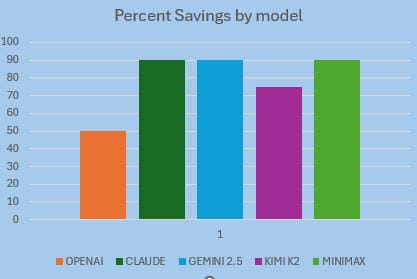
All in all, it is a significant saving, and gets important when using Agentic systems such as OpenClaw, running on API useage plans.
How different are they?
One of the important things to think about and know about with your AI model providers is the TTL time to live, or expiry time for the cache. With some you are able to adjust this time, such as Anthropic and GPT, others are set.
OpenAI GPT
Caching is on by default. OpenAI routes requests to servers that recently processed the same prefix. No API parameter needs to be set if your prompt is long enough, savings apply automatically.
Anthropic Claude
Claude offers the best savings, 90% off cached reads and the most control. You can use automatic caching by adding a top-level cache_control field, or use explicit breakpoints on individual content blocks for surgical precision. Up to 4 breakpoints per request.
Google Gemini
Google offers two modes. Implicit caching enabled by default. Explicit caching lets you create named cache objects with a configurable TTL and guarantees a discount every time the cache is referenced.
Kimi K2
Use "context caching" and it works automatically on Kimi models. Cached tokens are billed at the dramatically lower cache-hit rate. Availability on third-party platforms like Azure AI Foundry may be limited.
MiniMax
MiniMax implements automatic caching. The system uses prefix matching across tool lists, system prompts, and message history. It's for multi-turn conversations and agent workflows. Note that MiniMax models are also compatible with the Anthropic API format, giving with a path to use explicit breakpoints and control.
MiniMax, has a 512-token minimum shown below, is the lowest of any provider.
| Provider | Caching Type | Cost Saving | Default TTL | Max TTL | TTL Configurable? | Min Tokens |
|---|---|---|---|---|---|---|
| OpenAI GPT | Automatic | 50% off reads | 5-10 min | 24 hours | Yes (extended mode) | 1,024 |
| Anthropic Claude | Auto + Explicit | 90% off reads | 5 minutes | 1 hour | Yes (5 min or 1 hr) | 1,024 |
| Google Gemini (implicit) | Automatic | 75–90% off | Auto (≤24 hrs) | ~24 hours | No | 1,024-2,048 |
| Google Gemini (explicit) | Explicit | 90% off reads | 1 hour | No max documented | Yes (any duration) | 1,024-4,096 |
| Kimi K2 / K2.5 | Automatic | 75% off reads | Not documented | Not documented | Not publicly exposed | Not specified |
| MiniMax M2.5 / M2.7 | Automatic | ~90% off reads | Not documented | Not documented | Not publicly exposed | 512 |
Work with auto cache - what to do
- Place static content first, then dynamic content.
- Edits/mutations between requests should be added to the back of the prompt, not the front.
- Start looking at the stats the provider returns in the respose, check cache token counts, watch out for sudden changes in those figures.
- Watch the TTL, as users may be taking long breaks mid-session, more than 5-10 minutes that then causing cache to expire. Consider a background keep-warm mechanism for critical long sessions, weigh that off against extra token use of pinging the API regularly to keep the cache active.
- Stick on the same model, avoid switching between models in the middles of sessions, that causes cache loss (unless you have justificaiton).
- Consider purposfully stuffing input to hit the minimium token threshold, the savings might outweigh the extra content.
Summary
Auto caching is something most people are unaware of. It is only when dipping into the world of building agent workflows with API plans that consumption becomes real in your wallet. This is when everyone wakes up to making more efficient use of tokens, but a basic awareness is enough to not make silly mistakes and lose the benefit of the auto cache. It is worth thinking about caching as it is something worth adding to the mix when making a choice between model providers. Just let the cache do its thing, but don't get in its way.